Instagram posts, Stories and Reels
- 1Remove the AI label here and save the clean copy to your phone.
- 2In Instagram, pick the copy ending in -clean, not the original.
- 3Finish your AI edits first. An AI edit after cleaning writes a new label.
Free · runs in your browser
Remove AI labels from photos and videos before you post to Instagram, TikTok or Facebook. See every AI tag in your file, the app that wrote it and the platforms that read it, and get a clean copy in seconds.

chatgpt-cafe.png
1 AI label
C2PA Content Credentials · Made with AI · written by ChatGPT (OpenAI)
WHY IT HAPPENS
An AI label starts as data inside the file. When an app generates or edits a photo with AI, it writes a C2PA manifest or an IPTC "digital source type" into it, and Instagram, Facebook and Threads read that data on upload. These are the apps that write it.
Create or edit an image
Create or edit an image with Nano Banana
Magic Editor, Magic Eraser, Best Take, Add Me
Generative Fill, Generative Expand
Generative Remove
Generative Edit, Sketch to Image
AI image tools
Any photo you take
One small AI edit marks the whole photo. Drop your photo into the AI Label Remover above and the report names the exact app and field.
PLATFORMS
Each platform documents what its label is based on. Here is what each one reads, and what the AI Label Remover changes there.
| Platform | What its label reads | After you remove the AI label |
|---|---|---|
| InstagramFacebookThreadsInstagram, Facebook, Threads | What its label reads:C2PA and IPTC data in the file, a toggle you can switch on yourself, and Meta’s own image detection. | Removes file labelsThe file no longer triggers AI info. A label Meta adds after looking at the picture comes from the picture itself. |
| TikTokTikTok | What its label reads:C2PA data in the file. Since 2025 TikTok also adds its own invisible watermark to files that carry C2PA. | Removes the labelThe file no longer triggers the AI-generated label. Clean it before its first upload to TikTok. |
| YouTubeYouTube | What its label reads:C2PA data in the file, plus the disclosure you tick for realistic altered content. | Removes the labelThe file no longer triggers the label. Your own disclosure setting stays yours to choose. |
| LinkedInLinkedIn | What its label reads:C2PA data only. It shows a CR icon on images that carry it. | Removes the labelThe CR icon is gone. |
| PinterestPinterest | What its label reads:IPTC data in the file and Pinterest’s own image detection. You can appeal a label. | Removes file labelsThe file no longer triggers the Gen AI label. A label from image detection can be appealed. |
| XX | What its label reads:X has not published how it labels AI images. | No public rulesA clean file carries nothing for X to read. |
Sources: each platform’s help and newsroom pages on AI labels (Meta, TikTok, YouTube, LinkedIn, Pinterest).
HOW TO
Three steps with the AI Label Remover, all in your browser. The same steps work for videos.
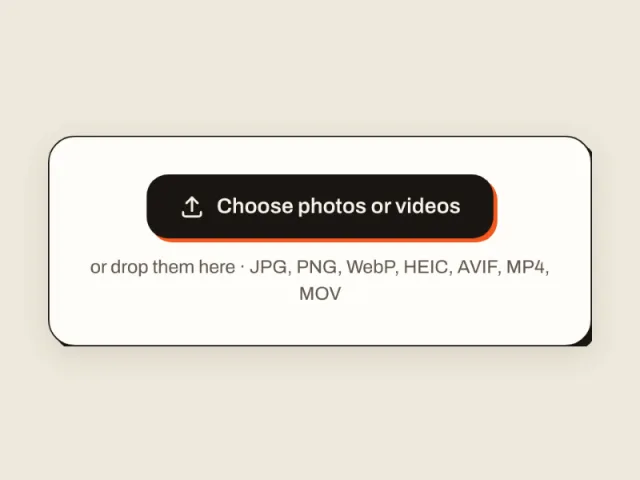
Pick it from your camera roll or drop it in. iPhone HEIC photos and MOV videos work too.
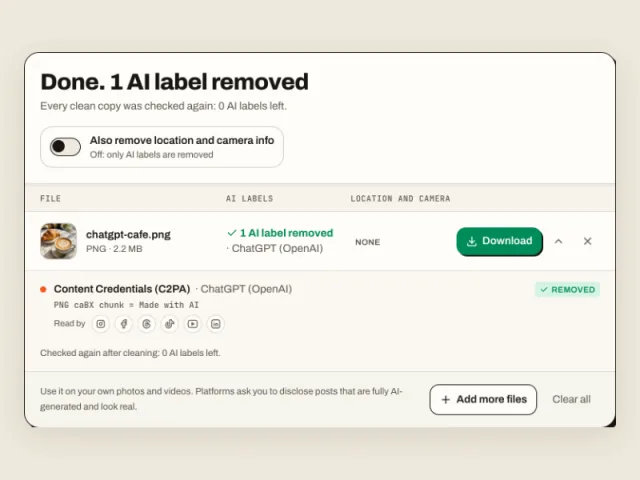
The file is read, cleaned and checked again on the spot. The report lists each AI label, the app that wrote it and the platforms that read it.
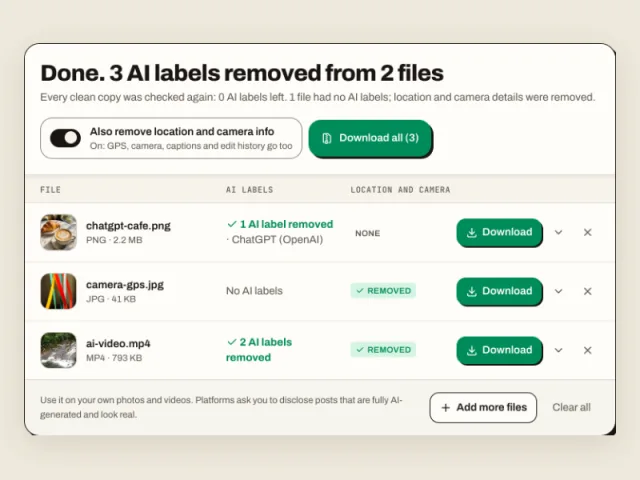
Save the clean copy and post that copy. Turn on Also remove location and camera info to clear GPS too.
BEFORE YOU POST
An AI label remover only helps if the clean copy is the file you upload. Three habits keep the AI data out of your upload.
A label stays on a post once it is published. Delete the post, remove the AI label from your original file here and post the clean copy as a new post.
C2PA VS SYNTHID
An AI image can carry a label in two places. One is data in the file. The other is a watermark woven into the pixels.
Pixel watermarks are read by detectors built for them, such as Google’s SynthID Detector. AI Label Remover leaves every pixel exactly as it is, so your photo looks the same and a pixel watermark stays where it is.
Yes, for your own photos and videos. The EU AI Act and California’s AI transparency laws put the labeling duty on AI companies and platforms, not on people who post. Some AI apps ask you in their terms to keep their marks, and platforms ask you to disclose posts that are fully AI-generated and look real, so follow those rules for that kind of post.
An app wrote AI data into it. Magic Eraser in Google Photos, Generative Fill in Photoshop and Galaxy AI edits each mark the whole photo, even for a small fix. Drop the photo into the AI Label Remover above to see which app did it. When the report shows no AI data and Instagram still adds the label, Meta judged the picture itself, and that label does not come from your file.
Not because of the file. After cleaning, the copy is checked again and carries 0 AI labels. Meta also runs its own detection on some images, and a label from that is based on the picture. Post the clean copy as a new post, because a label on a published post stays.
Not from the published post. Delete the post, remove the AI label from your original file here and post the clean copy again.
No. JPG, PNG, WebP, MP4 and MOV files keep their image data byte for byte; only the label data is taken out. HEIC and AVIF photos are saved as JPG at 95% quality, the format Instagram converts them to on upload.
No. AI Label Remover runs in your browser. Your photos and videos are read and cleaned on your own device and never sent to a server.
Yes. Open the site in Safari or Chrome, tap Choose photos or videos and pick from your library. On a phone, Save to Photos puts the clean copy back in your camera roll.
Yes. MP4 and MOV videos, including Sora videos and large phone recordings, are cleaned in your browser without re-encoding. The C2PA data and AI tags are removed and every frame stays as it was.
All metadata: the AI labels plus camera model, lens and exposure, GPS location, captions, copyright and edit history. It keeps the color profile and the rotation, so the photo looks the same.
Yes. It is a free AI label and AI tag remover with no sign-up and no daily limit. Add as many photos as you like and download them all as one ZIP.
Drop a photo or video into the AI Label Remover, read the report and download a clean copy in seconds.